Modeling with Linear Functions
Looking ahead
Objectives
- Given observed data, identify whether a linear model is appropriate.
- Given data exhibiting , approximate the slope and intercept by hand.
- In R, use
fitModel()to obtain the best-fit linear model. - In R, use
plotPoints()andplotFun()to plot data and functions on the same graph.
1. Reasonable Linear Models
Objective. Given observed data, identify whether a linear model is appropriate.
Definition 1 (Model).
A model is a mathematical function whose input and output correspond to observations of some phenomenon of interest.
The function on its own is not a model, because its input and output correspond to no observations.
Definition 2 (Linear function).
For constants and , a linear function is a function of the form
The slope of the line through the points and , with , is
The vertical intercept is the -coordinate of the point where the line intersects the -axis.
The function is not a linear function, because its input is squared. The definition requires the form , with to the first power.
A linear model is reasonable for a data set when the data points lie on approximately the same line. In a plot, the criterion is that one straight line passes close to every point, with no bend in the pattern. Points that bend along a curve call for another type of function.
In a table, the criterion is that the slopes of the lines through successive data points are approximately equal.
Judging from a table.
- Compute the slopes of the lines through successive data points.
- If the slopes are approximately equal, a linear model is reasonable.
- If the slopes grow or shrink steadily, the data are curved and a linear model is not reasonable.
Example 1
The table gives the number of Twitter users, in millions, by quarter. Year counts years since 2000, and is January to March 2011. Determine whether a linear model is reasonable for the data.
| Year | 11 | 11.25 | 11.5 | 11.75 | 12.75 |
| Users (millions) | 68 | 85 | 101 | 117 | 185 |
ShowHide solution
By the definition of a linear function, a line has one slope , and the slope of the line through and is
Substitute each pair of successive data points into the slope formula:
A linear model is reasonable, because the slopes are approximately equal: they range only from 64 to 68.
Example 2
The table gives the average weight of male fetuses, in grams, by gestational week. Determine whether a linear model is reasonable for the data.
| Week | 25 | 26 | 30 | 31 | 33 |
| Weight (g) | 777 | 888 | 1435 | 1633 | 2058 |
ShowHide solution
The slopes of the lines through successive data points are
A linear model is not reasonable, because the slopes increase steadily from 111 to 212.5 grams per week.
Example 3
Determine whether a linear model is reasonable for each data set.
- (a) The data set
WorldPopulationrecords the world population in billions by year. - (b) The data set
APCalculuscounts the Advanced Placement Calculus exams taken each year. - (c) The data set
MonthlyUnemploymentgives the United States (US) unemployment rate in percent by month, where Months counts months since December 2009.
ShowHide solution
Each plot comes from plotPoints() with the data = option (Lesson 2 sheet, section 6):
plotPoints(People ~ Year, data = WorldPopulation)
plotPoints(Exams ~ Year, data = APCalculus)
plotPoints(Rate ~ Months, data = MonthlyUnemployment)
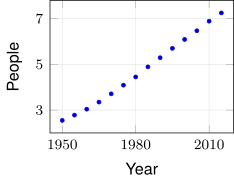
(a)
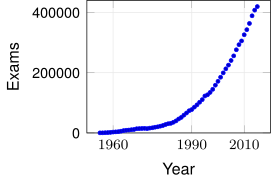
(b)
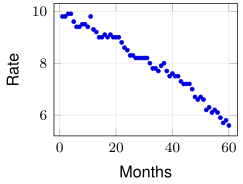
(c)
(a) A linear model is reasonable, because the 14 points lie close to one rising straight line.
(b) A linear model is not reasonable, because the points bend upward along a curve. From the data, the number of exams grows by per year from 1955 to 1975 and by per year from 1995 to 2015.
(c) A linear model is reasonable, because the points lie close to one falling straight line from 9.8 to 5.6 percent.
Next: 2. Slope and Intercept by HandLesson map
2. Slope and Intercept by Hand
Objective. Given data exhibiting , approximate the slope and intercept by hand.
A parameter is a constant in a model’s formula that can take on various values. Each choice of values for the parameters gives one function.
In , the parameters are the slope and the vertical intercept .
Estimating from the first and last data points.
- Take the first data point and the last data point .
- Compute the slope .
- Substitute the first point and into and solve for . The result is .
Full-precision slope. Use the unrounded slope when solving for , because a rounded slope shifts the intercept. To keep the full precision, carry the slope as a fraction or store it in R.
Intercept and the first data point. The vertical intercept equals only when or .
Example 4
The WorldPopulation data start at and end at , with People in billions. Approximate the slope and intercept of a linear model by hand from the first and last data points.
ShowHide solution
Substitute the first and last points into the slope formula:
Substitute the first point and the unrounded slope into , which is solved for :
The by-hand model is
with a slope of about 0.072 billion people per year.
The model keeps the slope as the fraction, because a Year input near 2000 multiplies the error in a rounded slope. Rounding the slope before solving for would give
instead, 0.6 away from .
Example 5
The MonthlyUnemployment data give the US unemployment rate, Rate in percent, by Months since December 2009. Approximate the slope and intercept of a linear model by hand from the first and last data points.
ShowHide solution
The two points are the first and last rows of the data set, which head() and tail() print. The second input, 1, asks for one row:
[commandchars=\\\{\}, fontsize=\small]
\textcolor{nsblue}{>\ head(MonthlyUnemployment, 1)}
  Months Rate
1      1  9.8
\textcolor{nsblue}{>\ tail(MonthlyUnemployment, 1)}
   Months Rate
60     60  5.6
With and ,
The by-hand model is . By this model, the rate fell by about 0.071 percentage points per month.
Next: 3. Best-Fit Linear Models with fitModel()Lesson map
3. Best-Fit Linear Models with fitModel()
Objective. In R, use fitModel() to obtain the best-fit linear model.
fitModel command.
model = fitModel(output ~ m*input + b, data = DataSet)
coef(model)
The formula reads “output is modeled by times input plus .” The parameter names and are free choices. The function fitModel() finds the values of the parameters, and coef() prints them.
The input and output names must match the column names of the data exactly. For vectors typed in with c(), leave data = off.
Best fit. The function fitModel() uses every data point.
Definition 3 (Best-fit line).
Among all lines, fitModel() finds the line that makes the sum of the squared vertical distances from the data points to the line as small as possible, and that line is the best-fit line.
For the three points , , and , the line through the first and last points is not the best-fit line. Its squared vertical distances add to , and the line gives a smaller sum:
The by-hand line of section 2 uses only the first and last data points. Because the by-hand line ignores the points between them, it usually differs from the best-fit line, as in Example 8.
Writing the model. The answer is an equation in the data’s own variable names, with the output on the left and the input on the right.
Misspelled variable name. With a name that does not match the data, fitModel() ends in an error:
[commandchars=\\\{\}, fontsize=\small]
\textcolor{nsblue}{>\ best = fitModel(Population ~ m*Year + b, data = WorldPopulation)}
\textcolor{red!70!black}{Error in eval(lhs(formula), data) : object 'Population' not found}
The command names(WorldPopulation) prints the names to use, Year and People.
Example 6
Use fitModel() to obtain the best-fit linear model for WorldPopulation. Then use the model to predict the world population in 1984 and in 2030, and compare the 1984 prediction with the recorded value for 1985.
ShowHide solution
By the definition of the best-fit line, fitModel() finds the line with the smallest sum of squared vertical distances to all 14 data points. Fit the model and print its parameters:
[commandchars=\\\{\}, fontsize=\small]
\textcolor{nsblue}{>\ best = fitModel(People ~ m*Year + b, data = WorldPopulation)}
\textcolor{nsblue}{>\ coef(best)}
            m             b
   0.07487912 -143.69428571
R labels each value with the parameter name from the formula: m is the slope and b the vertical intercept. The best-fit model is . Predict by calling the stored model best, a function that keeps the full-precision parameters:
[commandchars=\\\{\}, fontsize=\small]
\textcolor{nsblue}{>\ best(1984)}
[1] 4.86589
\textcolor{nsblue}{>\ best(2030)}
[1] 8.31033
The model predicts 4.866 billion people in 1984 and 8.310 billion in 2030. Print the recorded 1985 row of the data for the comparison. The line prints the row whose Year equals 1985:
[commandchars=\\\{\}, fontsize=\small]
\textcolor{nsblue}{>\ WorldPopulation[WorldPopulation$Year == 1985, ]}
  Year People
8 1985   4.89
The data have no 1984 row, and 1985 is the nearest recorded year. The recorded 4.89 billion for 1985 is within 0.03 billion of the 4.866 billion predicted for 1984, one year earlier.
Prediction is using a model’s output at an input to estimate an output that was not observed. The value best(1984) in Example 6 is a prediction.
Inference is using the values of a fitted model’s parameters to describe the relationship between the input and the output. Reading the slope in Example 6 is an inference: according to the best-fit model, the world population grew by about 0.0749 billion people, or 74.9 million, per year from 1950 to 2015.
An interpolation is a prediction at an input that lies inside the input interval used to create the model, from the smallest data input to the largest. The prediction for 1984 is an interpolation, because the data run from 1950 to 2015.
An extrapolation is a prediction at an input that lies outside the input interval used to create the model. The prediction for 2030 is an extrapolation, because the data end in 2015. An extrapolation can be far off, because the data give no evidence about outputs at inputs outside its input interval.
Example 7
An aircraft’s fuel gauge shows the percent of fuel remaining at five times in flight.
| Time (hours) | 0.5 | 1.0 | 1.75 | 2.5 | 3.25 |
| Percent | 89 | 79 | 56 | 43 | 21 |
Use fitModel() to obtain the best-fit linear model for Percent as a function of Time. Then predict the percent remaining at 2 hours and at 5 hours, and classify each prediction as an interpolation or an extrapolation.
ShowHide solution
Store the readings, fit the model as in Example 6, and evaluate it at 2 and 5 hours:
[commandchars=\\\{\}, fontsize=\small]
\textcolor{nsblue}{>\ Time = c(0.5, 1.0, 1.75, 2.5, 3.25)}
\textcolor{nsblue}{>\ Percent = c(89, 79, 56, 43, 21)}
\textcolor{nsblue}{>\ fuel = fitModel(Percent ~ m*Time + b)}
\textcolor{nsblue}{>\ coef(fuel)}
        m         b
-24.59898 101.87817
\textcolor{nsblue}{>\ fuel(2)}
[1] 52.6802
\textcolor{nsblue}{>\ fuel(5)}
[1] -21.11675
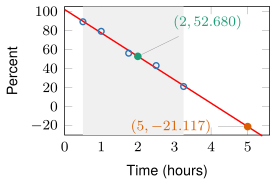
The best-fit model is . At 2 hours the model predicts 52.680 percent, an interpolation, because 2 lies between the first and last readings, 0.5 and 3.25.
At 5 hours the model predicts percent, an extrapolation, because 5 lies past the last reading at 3.25. A fuel level below zero is impossible, and this prediction shows how far off an extrapolation can be. In the figure, the shaded band is the input interval of the readings: the prediction at 2 hours sits inside it, and the prediction at 5 hours sits outside it.
Next: 4. Data and Functions on One GraphLesson map
4. Data and Functions on One Graph
Objective. In R, use plotPoints() and plotFun() to plot data and functions on the same graph.
A fitted model plots the same way as every other function (Lesson 2 sheet, sections 4 and 6).
Data and a model on one graph.
- Plot the data with
plotPoints(). - Fit the model with
fitModel(), or build a line withmakeFun(). - Add the model with
plotFun()andadd = TRUE, as inplotFun(best(Year) ~ Year, add = TRUE).
By-hand line from stored values. The function plotFun() treats every name in the formula other than the input as a free parameter, even a name with a stored value, and stops with an error:
[commandchars=\\\{\}, fontsize=\small]
\textcolor{nsblue}{>\ plotFun(slope*Year + intercept ~ Year)}
\textcolor{red!70!black}{Error in plotFun(slope * Year + intercept ~ Year) :}
\textcolor{red!70!black}{  Cannot plot with free parameters; try setting slope, intercept}
Build the line with makeFun() and pass the stored values to it, as in Example 8. In makeFun(), the options slope = slope and intercept = intercept give the formula’s names their stored values.
Example 8
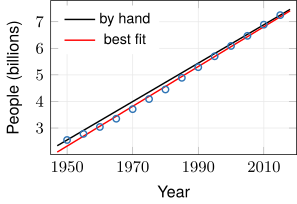
Plot the WorldPopulation data with the by-hand line through its first and last data points and the best-fit line on the same graph, and compare the two lines.
ShowHide solution
Plot the data, add the by-hand line from the slope and intercept formulas of Example 4, then add the best-fit line in red:
plotPoints(People ~ Year, data = WorldPopulation)
slope = (7.25 - 2.55)/(2015 - 1950)
intercept = 2.55 - slope*1950
hand = makeFun(slope*Year + intercept ~ Year,
slope = slope, intercept = intercept)
plotFun(hand(Year) ~ Year, add = TRUE)
best = fitModel(People ~ m*Year + b, data = WorldPopulation)
plotFun(best(Year) ~ Year, add = TRUE, col = "red")
The by-hand line passes through the first and last points and runs above the data from 1955 to 2005. The best-fit line fits the data better: it runs below the first and last points but closer to the points between them. In 1985, against the recorded 4.89 billion, hand(1985) prints [1] 5.080769, about 5.081 billion, and best(1985) prints [1] 4.940769, about 4.941 billion.
Example 9
Plot the fuel readings with their best-fit line on the same graph.
| Time (hours) | 0.5 | 1.0 | 1.75 | 2.5 | 3.25 |
| Percent | 89 | 79 | 56 | 43 | 21 |
ShowHide solution
Store the readings and plot them, then fit the model and add its line:
Time = c(0.5, 1.0, 1.75, 2.5, 3.25)
Percent = c(89, 79, 56, 43, 21)
plotPoints(Percent ~ Time)
fuel = fitModel(Percent ~ m*Time + b)
plotFun(fuel(Time) ~ Time, add = TRUE, col = "red")
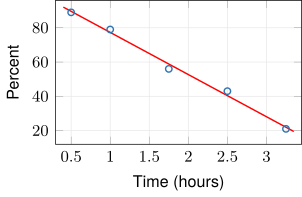
Every reading lies within 3 percentage points of the best-fit line, which supports a linear model for the fuel data.